How to manage complex business logic as one model
Complex business logic stays manageable when it lives in one place that a machine can check. Write the rules down once as a model: what exists, what can happen, who may do it. Then draw every diagram from that model and let every question about the logic go to it first.
This post shows how, with a small invoice approval flow as the example. The tool is Appling, an open source modelling language we sponsor and build our applications with. It is early (0.x), MIT licensed, and already usable for the steps below.
Why business logic gets out of control
Business logic rarely lives in one file. A status field sits in the database model, the permission check in a controller, the deadline in a cron job, and the “hide this button” rule in the frontend.
Each piece is correct on its own. Nobody can see the whole.
So a simple question like “who may approve an invoice, and from which state?” means reading four files and asking two people. Every new feature adds a fifth place.
flowchart LR
    subgraph Scattered["Logic spread over the code"]
      direction TB
      A1["models.py<br/>status field"]:::bad
      A2["views.py<br/>permission check"]:::bad
      A3["cron.py<br/>expiry job"]:::bad
      A4["Invoice.tsx<br/>button rule"]:::bad
    end
    subgraph One["Logic in one model"]
      direction TB
      M["billing.appling"]:::good --> V["validated"]:::good
      M --> D["drawn"]:::good
      M --> Q["queried"]:::good
    end
    Scattered --> One
    classDef good fill:#494fdf,stroke:#376cd5,color:#ffffff,stroke-width:2px
    classDef bad fill:#1e293b,stroke:#64748b,color:#f1f5f9,stroke-width:1.5px
Describe the logic once, as a model
A business logic model captures the rules, not the implementation. Four questions cover most of it:
- What exists? Entities, their fields, the allowed values.
- What can happen? Actions, state changes, scheduled jobs.
- Who may do it? Roles and policies.
- How is it reached? APIs and pages.
Appling sorts these into five layers, from Domain (what exists) up to Experience (how people reach it). References only point down the layers. That one rule keeps a growing model from turning into the same tangle as the code.
The model is plain text. It lives in git, goes through review, and diffs like code.
Visualize business logic from the model
A whiteboard diagram is out of date the day after the meeting. A diagram drawn from the model cannot drift, because it is computed from the same text every time.
Here is the invoice lifecycle we will model below. Each arrow is an action, and the model says who may run it:
flowchart LR
    draft -->|Submit<br/>Accountant| submitted
    submitted -->|Approve<br/>Manager| approved
    submitted -->|Reject<br/>Manager| rejected
    approved -->|MarkPaid<br/>Accountant| paid
    classDef state fill:#494fdf,stroke:#376cd5,color:#ffffff,stroke-width:2px
    class draft,submitted,approved,rejected,paid state
In Appling you do not draw this by hand. The IDE and the MCP window render it from the model.
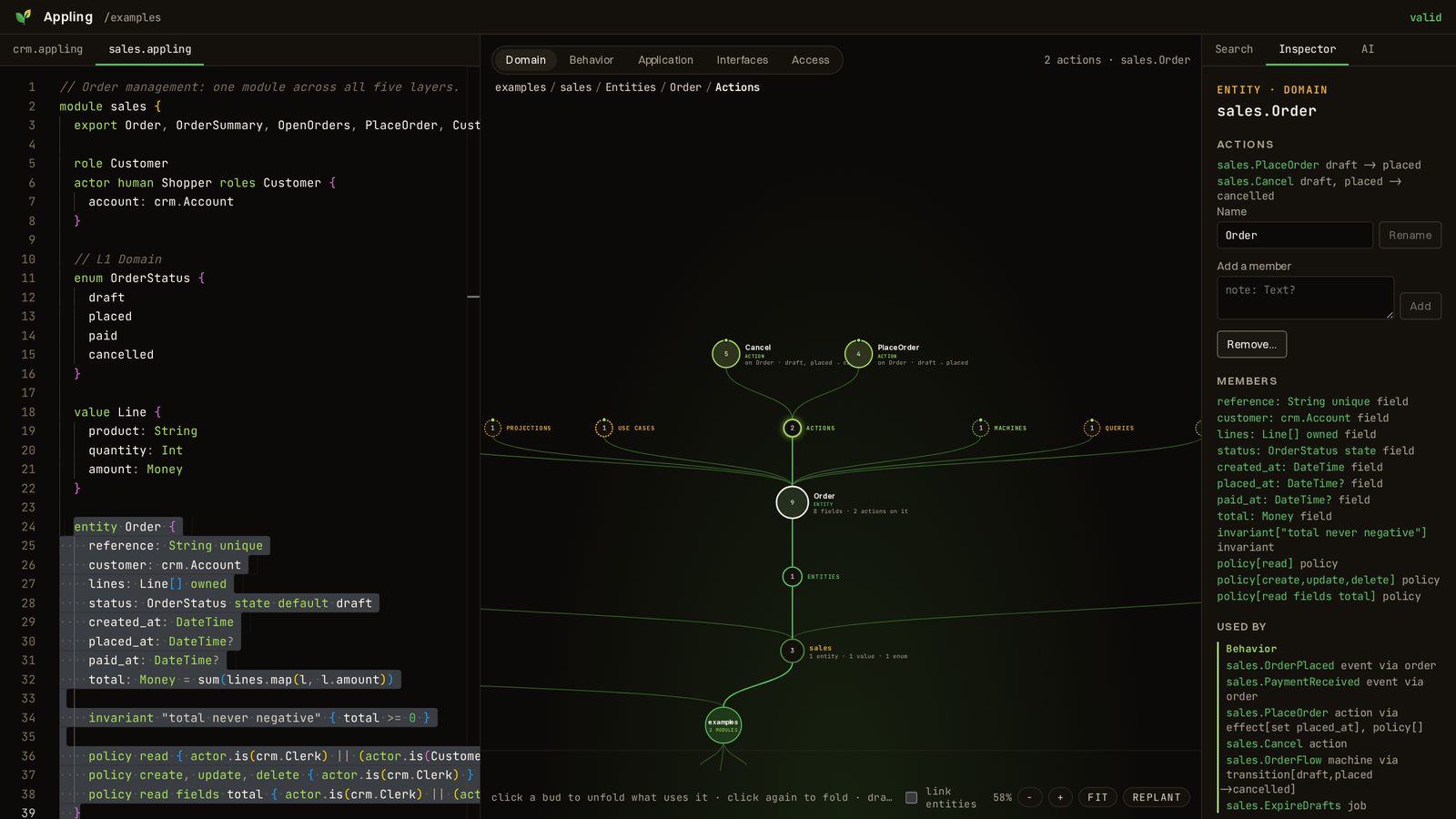
The canvas grows from the modules upwards and unfolds only what you click: here the Order entity of the sample sales model, then the actions that work on it. Every click also selects the source text on the left.
Keep business logic observable
Runtime observability (logs, metrics, traces) tells you what happened. Logic observability tells you what is allowed to happen, before anyone runs the code.
With a model you can ask, at any time:
- Can an invoice reach
paid, and through which steps? - Which roles may trigger
Approve? - Which rules does an action put at risk?
- Where in the code is this rule implemented?
Appling answers the first three with its simulator and the fourth with code references: a file and line range per element, which follow the code when lines move. The answers come from the model, so they hold for every implementation of it.
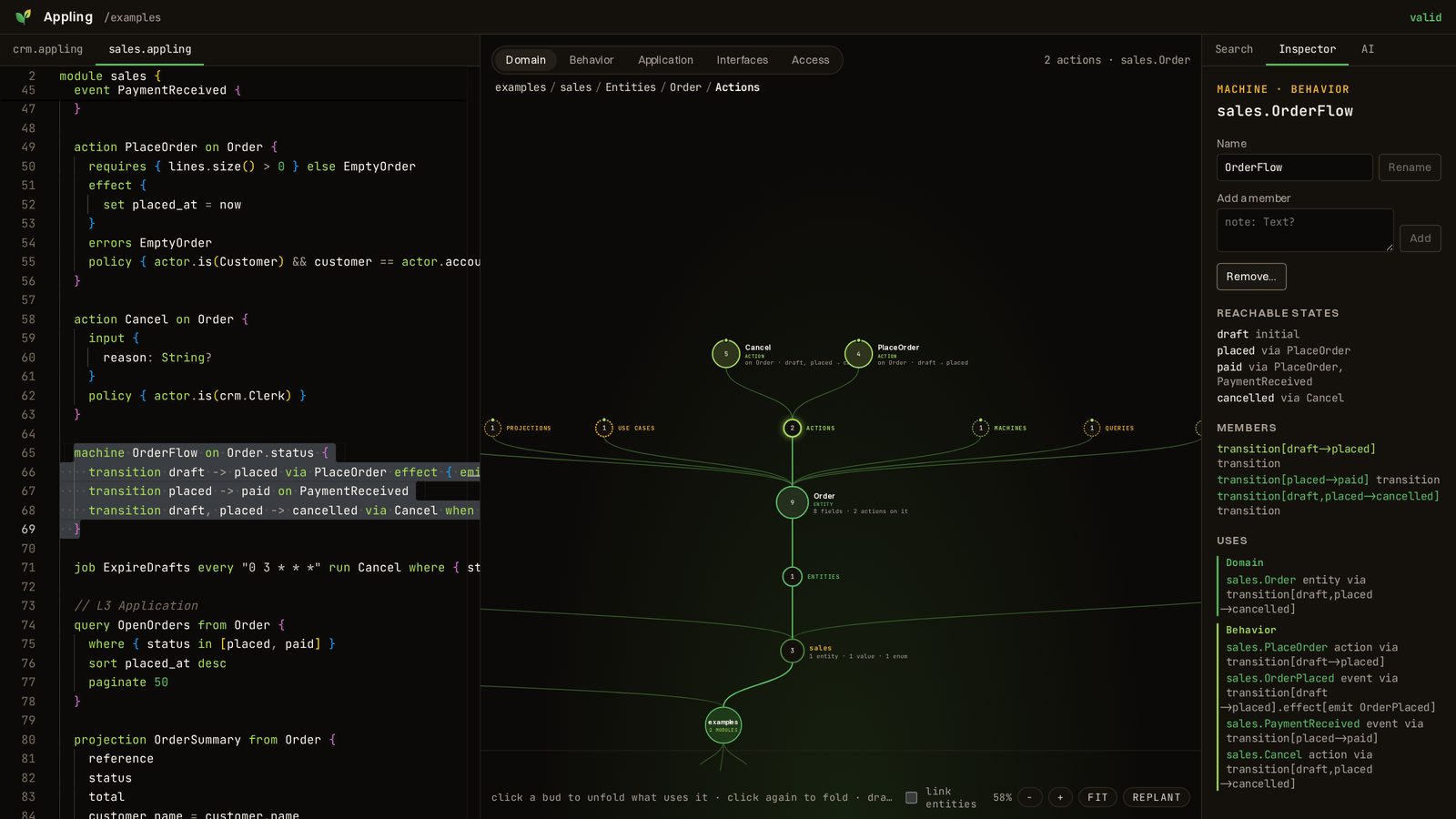
In the IDE these answers sit in the inspector. For a state machine it lists every reachable state with the steps that lead there:
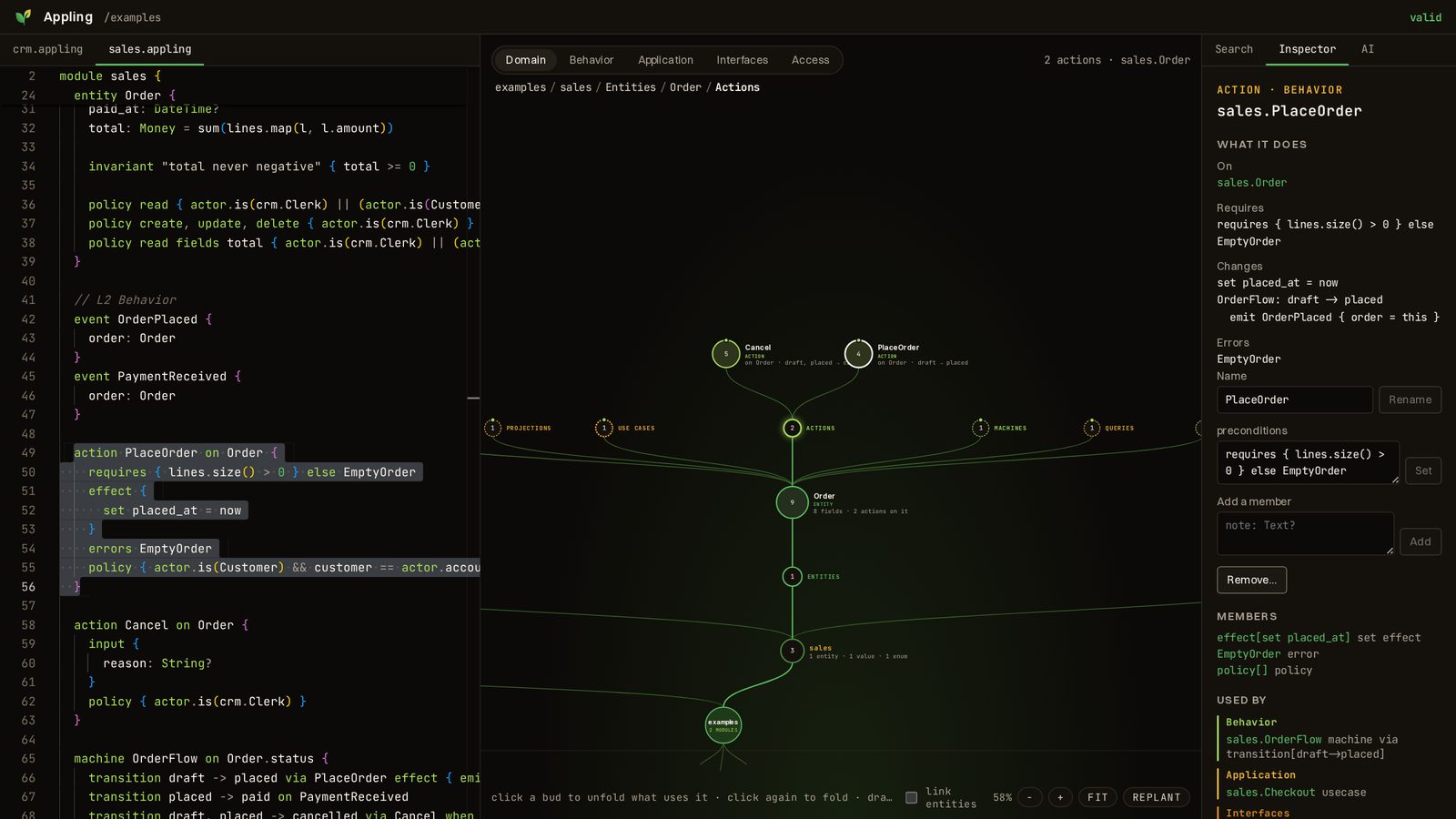
For an action it shows what the action requires, what it changes, which transition it drives, and where it is used:
Write your first Appling model
You need Node.js 24 or later. The whole setup takes about ten minutes. The installation guide lists the extra requirements for code generation.
1. Install the CLI and create the model folder.
npm install --save-dev @appling/climkdir models2. Write the first model file. Create models/billing.appling:
module billing {  role Accountant  role Manager  actor human Clerk roles Accountant  actor human Director roles Manager
  enum InvoiceStatus {    draft    submitted    approved    rejected    paid  }
  entity Invoice {    number: String unique    amount: Money    status: InvoiceStatus state default draft
    invariant "amount is positive" { amount > 0 }  }
  action Submit on Invoice {    requires { amount > 0 } else ZeroAmount    errors ZeroAmount    policy { actor.is(Accountant) }  }
  action Approve on Invoice {    policy { actor.is(Manager) }  }
  action Reject on Invoice {    input {      reason: String    }    policy { actor.is(Manager) }  }
  action MarkPaid on Invoice {    policy { actor.is(Accountant) }  }
  machine InvoiceFlow on Invoice.status {    transition draft -> submitted via Submit    transition submitted -> approved via Approve    transition submitted -> rejected via Reject    transition approved -> paid via MarkPaid  }}
The status field is marked state, so only the machine InvoiceFlow may change it. Each policy says who may run the action.
3. Check it.
npx appling check models1 file(s), 0 error(s)4. Break it on purpose. Change the last transition to approved -> settled and check again:
models/billing.appling:48:5 error "settled" is not a value of InvoiceStatus.1 file(s), 1 error(s)The exit code is 1, so the same command guards your CI. Change it back.
5. Ask the model questions.
npx appling simulate reach billing.InvoiceFlow paid modelsnpx appling simulate actors billing.Approve modelspaid is reachable from draft: Submit -> submitted Approve -> approved MarkPaid -> paid
billing.Clerk: nobilling.Director: yes6. Open the IDE.
npx @appling/ide modelsOpen http://127.0.0.1:4410. The text sits next to a map of the model, with a search over every element and an inspector that shows who may run each action. The IDE guide covers every panel.
To look first without installing anything, use the demo below. It is the same IDE with the sample sales and CRM model, running entirely in your browser. Click a circle on the canvas to unfold it, or pick an element in the search.
On a small screen, open the demo full screen.
Connect the Appling MCP server to Claude Code
The MCP server gives Claude Code validated access to the model. Claude reads it, asks the simulator, and edits it only through operations that keep the model valid.
1. Install the AI package.
npm install --save-dev @appling/ai2. Register the server for the model folder.
claude mcp add appling -- npx appling-mcp models3. Ask about the logic in plain words. Start Claude Code in the project and try:
Which roles may approve an invoice, and from which state?Claude answers from graph_query and simulate, not from guessing over source files. The server tells it that the model is the source of truth for business rules. The same principle drives our post on building a custom MCP server for Claude Code: a typed tool beats letting the model guess.
4. Change the logic. Ask for a change, such as “let a manager send a rejected invoice back to draft”. Claude uses the edit tool. An edit that would add an error is refused with the reason, and the file stays as it was.
sequenceDiagram
    participant You
    participant CC as Claude Code
    participant MCP as appling-mcp
    participant M as models/*.appling
    You->>CC: "Who may approve an invoice?"
    CC->>MCP: simulate actors billing.Approve
    MCP->>M: read and validate
    MCP-->>CC: Clerk: no, Director: yes
    CC-->>You: Only the Manager role, from submitted
Use the MCP visualization window
Over stdio, the Appling MCP server can open a small visualization window next to your terminal and draw the model there. You keep talking to Claude Code; the window shows what you are talking about.
1. Ask for a view.
Show me the invoice lifecycle.Claude calls visualize. A frameless window opens at the top right of the screen, above other windows, without taking focus from the terminal. The machine view draws one card per state with what can be done there. Other views draw entities, single actions, use cases and events.
2. Point at something. Click a card or a row to select it, then say “explain this” in the terminal. Claude reads your selection with visual_selection.
3. Review changes in the window. While the window is open, Claude proposes model changes with propose_edits. The window shows the summary and the changed lines. Accept writes them to the files; Reject leaves the files untouched and returns your comment to Claude.
4. Optional: type questions into the window. Questions typed there reach the session through Claude Code channels, a research preview. Start Claude Code with the server named:
claude --dangerously-load-development-channels server:applingThe window needs @appling/ai 0.1.2 or later. It runs on Electron and downloads the binary on first use. On Linux Wayland it runs through XWayland, which GNOME and KDE provide.
Start from the model, not from the code
The takeaway: complex business logic becomes manageable once it has one home that a machine validates, draws and answers questions about. Code, diagrams and AI edits then follow the model instead of each holding their own version of the rules.
Start with one workflow that hurts today, such as approvals or order states, and model only that. The Appling docs cover the full language, a ten minute first model tutorial, deriving a model from an existing codebase with Claude Code, and code generation for Django, Ash, Go and Rust. The source is on GitHub.
If you want help modelling a tangled process in your own system, talk to us.